
No Job is Too Big or Too Small!

7 Best OCR Inspection Systems for Global Buyers

Packaging lines rarely fail in dramatic ways. A faint date code, a shifted label, or one blurred character can quietly disrupt inspection records and product flow. Ocr Inspection systems use cameras and text-recognition software to read printed or marked information, then compare it with expected values. Their performance depends on more than recognition accuracy. Lighting, print quality, line speed, camera placement, and integration with existing equipment all matter. Small details matter.

For global buyers, choosing a system also means weighing support availability, language handling, data storage, and the practical cost of maintenance. A strong demonstration should use samples from your own production line, including worn packaging, reflective surfaces, and slightly misaligned codes. Ask how the system flags uncertain reads, records inspection results, and handles recipe changes. Those answers reveal more than a polished sales demo. There is no universal winner.

This guide compares seven OCR inspection systems through buyer-focused criteria, including detection capability, usability, integration options, and service support. Product specifications can change, and advertised performance may not reflect every factory’s conditions. That part is easy to overlook. Treat any shortlist as a starting point, then verify requirements with vendors and run a controlled trial before committing. The best fit is usually the system that performs consistently on real production samples, not the one with the longest feature list.
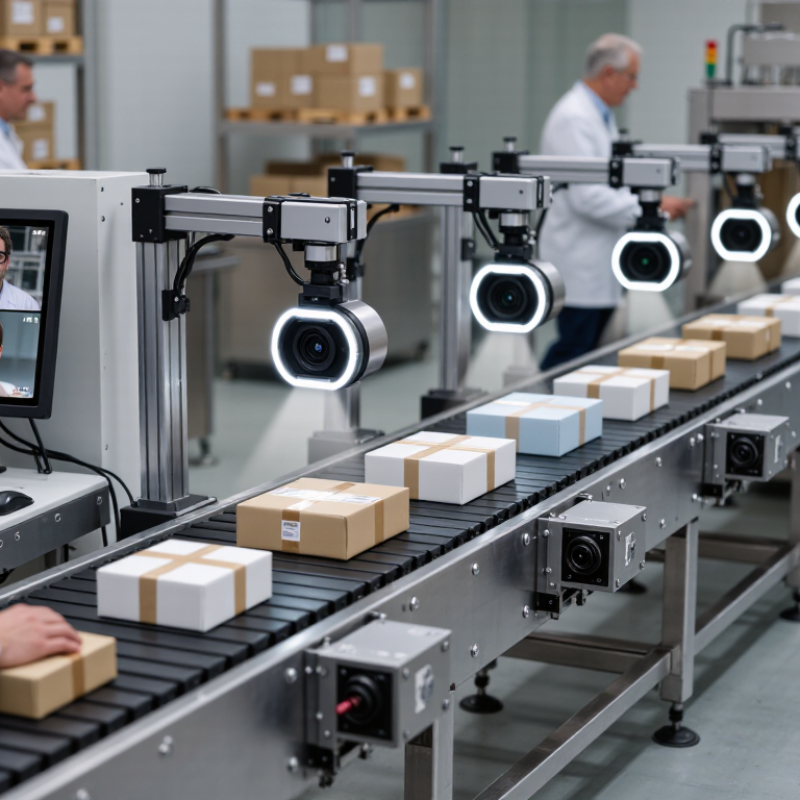
7 Best OCR Inspection Systems for Global Buyers

What OCR Inspection Systems Are and How They Work

OCR inspection systems read printed or marked characters on products, labels, and packaging as items move along a production line. They turn images into text. A camera captures each item at a fixed inspection point, while controlled lighting helps reveal ink, embossing, or faint marks without excessive glare. Software locates the text, recognizes individual characters, and compares the result with expected information. If a date code is missing, blurred, or incorrect, the system can flag the item for review or removal. The response depends on how the line is configured.

OCR is not magic. A glossy pouch, curved bottle, or small ink smudge can confuse recognition, especially when print quality varies. Teams should test samples from real production shifts, including items with worn printheads and changing light. They also need to set acceptable reading confidence carefully: a threshold that is too strict may create needless rejects, while a loose one can miss errors. Regular checks of camera focus, lighting, and sample results help keep readings dependable. Yet setup takes adjustment, and some products remain harder to inspect than expected.

How OCR Inspection Systems Work

A typical OCR inspection workflow, from image capture to pass/fail output.

The values show workflow order, not accuracy or processing time. In practice, systems capture an image, prepare it for analysis, locate and recognize text, check it against defined requirements, then record or signal the result.

Core Technologies Behind Automated Text Inspection

Automated text inspection begins with a stable image, not the recognition model alone. A camera captures printed codes, dates, or small characters as products move along a line. Controlled lighting reduces glare on glossy packaging and shadows around embossed text. Even a slight camera angle can turn a clear “8” into a doubtful “3.” Small details matter.

Image-processing software then adjusts contrast, removes noise, and separates text from its background. Optical character recognition converts those shapes into machine-readable characters. Some systems also compare the result with expected formats, such as a date pattern or a fixed character count. This second check can catch errors that look plausible to the model. Confidence scores help route uncertain reads for another image or human review. They are useful, but not a guarantee. Dust, curved surfaces, faded ink, and rapid motion still cause missed characters. In practice, teams should test with real production samples, including awkward cases, rather than ideal images alone. A few edge cases will likely remain. That is worth documenting. Regular checks of focus, lighting, and rejection rates help reveal when performance has drifted.

Criteria for Comparing OCR Inspection Systems

Criteria for comparing OCR inspection systems should begin with the actual production task: character type, print method, line speed, and surface material. A system reading dark ink on a flat carton faces different risks from one checking faint marks on curved, reflective parts. NIST’s Special Database 19 contains 810,000 handwritten character images from 3,600 writers. That dataset shows how much character shapes can vary, but it does not predict factory performance. Test real samples.

Compare systems using exact-match accuracy, missed reads, false rejects, and cycle time. Ask suppliers to report each measure separately; a single “accuracy” figure can hide costly failure types. Test under changing light, motion blur, smudges, and expected print variation. Keep a record of sample counts and test conditions. Small test sets mislead.

Also check recipe changes, audit logs, and integration with existing line controls. A useful trial logs every read decision and lets operators inspect the original image beside the result. Measure performance across shifts, not just during a polished demonstration. One weak point deserves attention: a high lab score may collapse when glare or vibration appears. NIST’s benchmark is a reference, not a substitute for site validation. Request a documented acceptance test using your own difficult samples before comparing purchase costs.

Seven OCR Inspection Systems for Global Buyers

Global buyers comparing seven OCR inspection systems should match the camera setup to the production line. Smart-camera systems read printed dates and codes near the conveyor, while area-scan cameras capture whole labels in one image. Line-scan systems build images of fast-moving or wide products. PC-based machine-vision systems allow more control over complex inspection rules. Embedded edge systems process images close to the equipment. Multispectral systems can help reveal low-contrast marks. Portable systems support spot checks across several stations. Each option has trade-offs.

In practice, lighting and label position can matter as much as the OCR engine. A glossy pouch may reflect overhead lights; a slightly tilted carton may shift characters outside the reading area. Test samples from real shifts, including faded ink, wrinkles, and different print speeds. Short trials help. Measure missed reads and false rejects, not just average accuracy. A strong demonstration can still disappoint on a dusty line.

Global procurement teams should also confirm supported writing systems, image storage options, network interfaces, and local service availability. Ask how recipes are backed up and restored after a controller change. Confirm whether operators can review uncertain reads without slowing production. Small details matter. Sometimes a simpler camera system is easier to maintain than a highly customized setup. I would not choose by specification sheet alone; real packaging samples expose inconvenient gaps early.

Industry Applications and International Deployment Considerations

OCR inspection systems serve very different needs across factories, warehouses, and distribution centers. In food production, cameras may verify date codes on curved containers moving beneath bright lights. Electronics lines often need to read tiny serial numbers on reflective components. Logistics teams may inspect shipping labels across mixed package sizes and print quality. The best fit depends on the actual task, not a headline accuracy figure. Small details matter.

International deployment adds practical challenges. A system may need to recognize several scripts, decimal formats, and label layouts, while coping with local variations in print quality. Test it on real samples from each site, including faded ink, glare, tilted labels, and fast conveyor speeds. A clean demonstration sample proves little. That can be frustrating, but it is important. Lighting, camera distance, and lens maintenance also need consistent setup instructions for local teams.

Buyers should ask how confidence scores, unreadable images, and inspection records are handled. Clear exception workflows let operators review uncertain results instead of trusting every reading blindly. Network access and data storage may differ between facilities, so confirm technical requirements with each site before rollout. Plan for training, calibration, spare parts, and language support. Even careful planning will miss something; pilot testing often reveals the gap.

7 Best OCR Inspection Systems for Global Buyers - Industry Applications and International Deployment Considerations

System Type Typical Industry Applications Inspection Tasks Deployment Requirements International Considerations Strengths and Limitations
Packaging Code OCR/OCV Food, beverage, cosmetics, and household-product packaging. Reads or verifies printed lot codes, production dates, and expiry dates on cartons, bottles, and flexible packages. Requires suitable lighting, a stable camera view, and a trigger synchronized with the packaging line. Ink contrast, print position, and package movement affect results. Configure date formats, character sets, and code rules for each destination market. Confirm that code content and placement meet applicable local labeling requirements. Well suited to checking variable production codes. Curved, reflective, wrinkled, or low-contrast surfaces may require additional lighting or a different camera angle.
Label Text and Code Inspection Pharmaceuticals, medical products, chemicals, and consumer goods. Reads label text and checks selected fields, such as product identifiers, batch numbers, or human-readable codes, against configured expectations. Needs controlled label presentation and clear inspection regions. Recipe management helps operators switch between product variants. Account for language, alphabet, units, decimal conventions, and country-specific label layouts. Translation and regulatory content should be validated by qualified personnel. Can help detect missing, incorrect, or poorly printed text. OCR alone does not establish that all label content is legally compliant.
Pharmaceutical Serialization Inspection Pharmaceutical packaging lines, including cartons and labels carrying serialized identifiers. Reads human-readable serial data and may work alongside barcode inspection to verify that printed text agrees with encoded data. Requires reliable data exchange with line-control or serialization software, clear print quality, and appropriate reject handling. End-to-end testing is important before production. Serialization and traceability rules vary by jurisdiction and product. Verify current local requirements, data formats, retention policies, and system-validation expectations. Supports inspection of variable identifiers at the line. OCR verifies visible characters; it does not, by itself, confirm that a code is unique or correctly recorded in an external database.
PCB and Electronic Component Marking Inspection Electronics manufacturing, printed circuit boards, and component assembly. Reads board identifiers, component markings, and printed reference text where character size and contrast permit. Often requires close-up optics, stable fixturing, appropriate illumination, and inspection recipes for different board designs. Plan for multilingual operator interfaces, regional maintenance support, and compatibility with factory networks and manufacturing execution systems. Useful for traceability and presence checks. Tiny characters, glare, dense layouts, and varying surface finishes can make OCR challenging.
Automotive Part and Component Marking Inspection Automotive assembly and suppliers producing labeled or directly marked parts. Reads alphanumeric identifiers on labels or direct part markings for production tracking and process verification. Consider part variation, vibration, surface reflectivity, marking method, and camera protection in the production environment. Standardize character sets, identifier formats, and interfaces across sites. Confirm environmental and quality-system requirements with the customer and local plant. Can support part identification at inspection or assembly stations. Direct marks on textured, curved, oily, or low-contrast surfaces may need tailored optics and lighting.
High-Speed Web and Film OCR Inspection Flexible packaging, labels, paper, and other continuously moving web materials. Reads repeating printed text or variable codes while material moves through a converting or printing line. Requires line-speed synchronization, stable web handling, suitable illumination, and inspection timing matched to print position and product pitch. Allow for regional power and network requirements, local safety practices, and differences in print layouts and code conventions across product markets. Can inspect repeated content without stopping the web. Motion blur, web flutter, print variation, and changing splice or registration conditions can reduce reading reliability.
Document and Form OCR Inspection Logistics, warehousing, manufacturing records, and administrative document processing. Extracts printed text from forms, shipping documents, work orders, or batch records and can check required fields for presence or consistency. Benefits from consistent scanning or imaging, document templates, and review workflows for uncertain or handwritten fields. Consider supported languages, privacy and data-protection obligations, document-retention rules, and the location where captured data is processed. Useful for reducing manual data entry on structured documents. Handwriting, poor scans, unusual layouts, and ambiguous characters may require human review.

Selection note: OCR recognizes characters, while OCV typically compares printed characters with expected content. Actual performance depends on print quality, lighting, line speed, camera setup, and application-specific testing.